The Mom’s AI Income Blueprint — Build an Online Income Around Your Family
For Moms
Build an Online Income Around Your Family, Not the Other Way Around
A calm, step-by-step path for moms who want to learn AI, Pinterest marketing, and affiliate income, fit into naptime, not your whole life. No tech background required.
In the fast-paced world of digital marketing, having the right tools can be the difference between a struggling side hustle and a thriving online business. However, for beginners, the sheer number of software options and their price tags can be overwhelming.
The good news? You don’t need a massive budget to start seeing results. Some of the most powerful tools used by professionals offer incredibly robust free versions. Whether you’re looking to track your website traffic, design stunning visuals, or automate your social media, these seven tools will give you a professional edge without costing a cent.
In this guide, we’ll break down the top 7 free digital marketing tools that every beginner should master to grow their online presence.
1. Google Analytics (GA4)
The Ultimate Data Powerhouse
If you aren’t measuring your results, you’re just guessing. Google Analytics is the gold standard for understanding who is visiting your website and what they do once they get there.
For beginners, the latest version (GA4) provides deep insights into the “customer journey.” You can see which blog posts are most popular, where your visitors are coming from (social media, search engines, or direct links), and how long they stay on your pages.
Best For: Tracking website traffic, user behavior, and conversion rates.
Key Free Feature: Real-time reporting and advanced audience segmentation.
Pro Tip: Focus on your “Bounce Rate” and “Average Engagement Time” to see if your content is actually resonating with your audience.
You don’t need to be a graphic designer to create beautiful marketing materials. Canva has revolutionized the industry with its intuitive drag-and-drop interface and thousands of professional templates.
From Pinterest pins and Instagram reels to eBooks and logos, Canva allows beginners to maintain a high-quality brand aesthetic with ease. Their free plan is surprisingly generous, offering millions of photos, graphics, and hundreds of free fonts.
Best For: Social media graphics, presentations, and branding assets.
Key Free Feature: Access to a massive library of templates and a user-friendly mobile app.
Email marketing remains one of the highest ROI (Return on Investment) strategies in digital marketing. Mailchimp is the perfect starting point for beginners looking to build an email list and send professional newsletters.
Their free plan allows you to manage up to 250 contacts and send 500 emails per month. It also includes basic automation, such as “Welcome Emails,” which automatically greet new subscribers the moment they sign up.
Best For: Building an email list and nurturing customer relationships.
Key Free Feature: One-click automated welcome emails and basic reporting.
While Google Analytics tells you what people do on your site, Google Search Console tells you how they found you in the first place. This is an essential tool for anyone serious about SEO (Search Engine Optimization).
It shows you exactly which keywords people are typing into Google to find your website, your average ranking for those terms, and whether Google is having any trouble “crawling” or indexing your pages.
Best For: Monitoring search performance and fixing technical SEO issues.
Key Free Feature: Search performance reports and sitemap submission.
Posting consistently on social media is exhausting. Buffer allows you to “set it and forget it” by scheduling your posts in advance.
The free plan lets you connect up to three social media channels (like Instagram, Pinterest, and LinkedIn) and schedule up to 10 posts per channel at a time. This means you can spend one afternoon planning your content for the entire week, leaving you free to focus on other parts of your business.
Best For: Scheduling social media posts and maintaining consistency.
Key Free Feature: Multi-channel scheduling and a built-in AI assistant for captions.
To rank on Google, you need to know what people are searching for. Ubersuggest, created by marketing expert Neil Patel, is one of the most beginner-friendly SEO tools available.
Even the free version provides valuable data on keyword volume, competition levels, and even suggests related keywords you might have missed. It also offers a “Site Audit” feature that tells you exactly what to fix on your website to rank higher.
Best For: Keyword research and competitor analysis.
Key Free Feature: Daily keyword searches and basic site health audits.
Artificial Intelligence has changed the marketing game, and ChatGPT is the leader of the pack. For beginners, ChatGPT acts as a tireless brainstorming partner.
You can use it to generate blog post ideas, write social media captions, draft email subject lines, or even create a full marketing plan for your next product launch. It’s like having a marketing consultant available 24/7 for free.
Best For: Content creation, brainstorming, and copywriting.
Key Free Feature: Instant text generation and creative problem-solving.
Note: Always review and personalize AI-generated content to ensure it matches your unique brand voice!
Digital marketing doesn’t have to be expensive or complicated. By mastering these seven free tools, you’ll have everything you need to track your growth, design stunning assets, and reach your target audience effectively.
Mom’s AI Income Blueprint Ad
✨ Beginner Friendly
Your Next AI Income Stream Starts Here.
Discover simple AI-powered side hustles you can start from home—
no experience, no expensive software, just practical step-by-step guidance.
Every digital marketer has been there! You open ChatGPT or Claude, type something like “write me a blog post about email marketing,” and get back content so bland it could put a caffeine addict to sleep.
The problem isn’t the AI. It’s the prompt.
The difference between mediocre AI output and content that actually ranks, converts, and sounds like a human wrote it comes down to one thing: how you ask. Vague prompts produce vague results. Specific, structured prompts produce work you can actually use.
In this post, I’m sharing the best AI prompts for digital marketers across eight categories plus five completely free ones you can steal right now. Whether you’re running a blog, managing social media, building an email list, or running paid ads, there’s something here for you.
Why Most AI Marketing Prompts Fail
Before we get into the prompts, it’s worth understanding why so many people get disappointing results from AI tools.
Most prompts fail because they’re missing three things:
1. Context : AI doesn’t know your audience, niche, tone, or goal. Without that context, it defaults to generic.
2. Structure : Telling the AI what to produce isn’t enough. You need to tell it how to structure the output so it’s immediately usable.
3. Specificity : “Write a social media post” is too open. “Write a LinkedIn post under 1,300 characters with a bold opening statement, three actionable insights, and a question to drive comments” gives the AI a blueprint to follow.
The prompts below solve all three problems. Each one includes context, a clear structure, and specific instructions so you get output worth using.
The 8 Categories of High-Performance Marketing Prompts
A complete marketing operation touches a lot of different channels. Here’s what the best AI prompt workflow covers:
Content creation (blogs, articles, scripts)
SEO and keyword research
Social media content
Email marketing
Paid advertising
Sales and conversion copy
Business productivity and operations
Affiliate marketing
Let’s dig into each category with real, usable prompts.
Content Creation Prompts
Content is the engine of most digital marketing strategies and it’s one of the most time-consuming parts of the job. These prompts speed up the entire process without sacrificing quality.
Free prompt #1: Blog post outline generator
Create a detailed blog post outline for the topic: [TOPIC]. Target audience: [AUDIENCE]. Include an attention-grabbing H1, 5–7 H2 subheadings with 2–3 bullet points each, a compelling intro hook, and a strong CTA. Optimize for the keyword: [KEYWORD].
This prompt is the starting point for any long-form piece. Instead of writing from a blank page, you get a ready-made structure that’s already optimized for your target keyword. Fill in the topic, audience, and keyword, and you’ll have a complete blog framework in under a minute.
Use it for: Blog posts, pillar pages, long-form articles
Free prompt #2: Content repurposing machine
Take this existing blog poTitle Page Separator Site titlest: [PASTE CONTENT]. Repurpose it into: (1) a 280-character tweet, (2) a LinkedIn post with 3 key takeaways, (3) a 60-second video script, and (4) 5 Instagram carousel slide captions. Keep the core message consistent.
So this one prompt extracts four pieces of content from a single source. If you’re publishing one blog post per week, this prompt alone could fill your entire social media calendar without writing anything from scratch.
Use it for: Multi-channel content strategies, content repurposing workflows
Other content prompts worth having
Beyond these two freebies, high-output marketers also use prompts for:
Writing three different intro paragraph styles (shocking statistic, relatable story, bold claim) to A/B test engagement
Building full content briefs with search intent, competitor angles, and recommended word counts
Generating 10 SEO-optimised FAQ questions and answers for any topic
Writing compelling case studies in a structured challenge → solution → results → takeaways format
SEO and Keyword Research Prompts
AI won’t replace your SEO tools, but it dramatically speeds up the strategy work clustering keywords, writing meta copy, and identifying content gaps.
Free prompt #3: Keyword cluster builder
I run a website about [NICHE]. Generate a keyword cluster around the seed keyword [KEYWORD]. Include: 5 short-tail keywords, 10 long-tail variations, 5 question-based keywords, and 3 buyer-intent keywords. Format as a table with search intent (informational/commercial/transactional).
One of the most tedious parts of SEO content planning is keyword research. This prompt gives you a structured cluster including buyer intent terms that are often overlooked in seconds. The table format means you can drop it straight into a content calendar.
Use it for: Content strategy, topic clustering, editorial planning
Other useful SEO prompts in a complete pack include schema markup generation (JSON-LD for articles), SEO title tag variations using proven click-through formulas, internal linking strategy recommendations, and meta description writing across three conversion-focused angles.
Social Media Prompts
The hardest part of social media isn’t posting it’s generating fresh ideas consistently. These prompts solve the blank-page problem for every platform.
Free prompt #4: Viral hook formula
The hook is 80% of the battle on any social platform. This prompt generates 10 different approaches, so instead of guessing what will stop the scroll, you have a menu of options to test. Run the top three and see what your audience responds to.
Use it for: LinkedIn, Instagram, TikTok, X (Twitter)
Rounding out the social media category, other essential prompts cover: 30-day content calendars (with content type, post theme, and caption direction), Twitter/X threads formatted 1/10 to 10/10, platform-specific Instagram caption styles, and full TikTok scripts with stage directions and timing cues.
Email Marketing Prompts
Email remains one of the highest-ROI channels in digital marketing and also one of the most demanding in terms of consistent output. These prompts cover the full lifecycle from welcome sequences to re-engagement campaigns.
Free prompt #5: Welcome email sequence
Write a 5-email welcome sequence for new subscribers of [BRAND NAME] in the [NICHE] space. Email 1: warm welcome + deliver freebie. Email 2: your story/why. Email 3: biggest value tip. Email 4: address top objection. Email 5: soft pitch for [PRODUCT]. Include subject lines for each.
A great welcome sequence is the difference between a list that buys and one that goes cold. This prompt outputs the full five-email arc with subject lines covering relationmon objections mapped with a one-sentence acknowledgment, a two-sentence reframe, and a proof point for each. This alone is worth building into your sales page and any live sales calls.
Sales page writer — A full long-form sales page structure covering headline, hook story, probship building, value delivery, objection handling, and a soft conversion moment. It’s one of the highest-leverage prompts in any email marketer’s toolkit.
Use it for: Email list nurturing, new subscriber onboarding
The email category also extends to subject line A/B testing (with 10 variations across five psychological trigger types), re-engagement campaigns for lapsed subscribers, 7-email product launch sequences, weekly newsletter templates, and cold outreach emails under 150 words.
Paid Advertising Prompts
Writing ad copy from scratch is one of the most expensive ways to spend a copywriter’s time. These prompts give you a starting framework across every major ad format.
Facebook and Instagram, the best approach is a three-angle structure: pain-point focused, dream outcome focused, and social proof focused. Having all three ready lets you test different psychological hooks without briefing a copywriter for each variation.
For Google Search, headline prompts that produce 15 variations under 30 characters (across benefit, feature, and urgency angles) keep your ad groups fresh for testing.
The re-targeting category is especially valuable prompts that write short ads specifically addressing the three most common purchase objections (price, trust, and timing) with built-in urgency elements.
Sales and Conversion Prompts
Getting traffic is only half the job. These prompts help turn visitors into buyers.
The most used prompts in this category:
Objection handler — Input your product, price, and audience, and get the seven most common objections mapped with a one-sentence acknowledgment, a two-sentence reframe, and a proof point for each. This alone is worth building into your sales page and any live sales calls.
Sales page writer — A full long-form sales page structure covering headline, hook story, problem section, features-to-benefits list, social proof placeholders, objection handling, urgency element, and CTA. Fill in the variables and you have a complete first draft.
Price anchoring script — Structures your pricing section using value stacking, daily cost breakdown, bonus listing, and a “what you get today” summary. Particularly useful for digital products and online courses.
AI Productivity Prompts
Beyond marketing output, AI is genuinely useful for the operational side of running a business. Prompts in this category cover:
Business idea validation — Acts as a skeptical investor to analyse market size, competition, revenue streams, and risks, rated out of 10 with reasoning
SOP creator — Produces a full standard operating procedure for any repeatable task, formatted so a new team member can follow it independently
Weekly review template — A structured 15-minute review covering wins, revenue vs goal, blockers, lessons learned, and next week’s priorities
Client onboarding sequence — The full new client workflow including welcome email, intake questionnaire, kickoff agenda, and first-week check-in
Affiliate Marketing Prompts
Affiliate content lives or dies on trust and specificity. Vague reviews don’t convert. These prompts produce the structured, honest content that earns clicks.
A comparison post framework is particularly strong and it outputs a complete “[Product A] vs [Product B]” article with a TL;DR verdict, comparison table, deep-dive sections, use-case scenarios, and a final recommendation with affiliate CTA. Comparison posts consistently rank well and have high commercial intent, making them among the most valuable pages in any affiliate site.
The bonus stack creator is another standout: input an affiliate product and price, and get five complementary bonuses with names, descriptions, perceived dollar values, and explanations of how each bonus complements the main product. This is the kind of offer architecture that separates average affiliate pages from ones that actually convert.
How to Get Better Results From Any AI Prompt
A few principles that apply regardless of which prompts you use:
Replace every variable. The [BRACKETED] placeholders are there for a reason. The more specific you are with your actual niche, audience, product name, and tone — the more usable the output will be.
Iterate, don’t accept the first draft. AI output is a first draft, not a finished product. Follow up with: “Make the tone more conversational,” “Shorten this by 30%,” or “Add a stronger sense of urgency to the CTA.”
Save your best outputs as templates. When a prompt produces something great, but save both the prompt and the output. Over time you’ll build a swipe file of your best-performing AI-generated copy.
Combine prompts. Use the blog outline prompt to structure an article, then run the intro paragraph prompt on each section, then the FAQ generator for the bottom of the post. Prompt chaining produces far better output than using any single prompt in isolation.
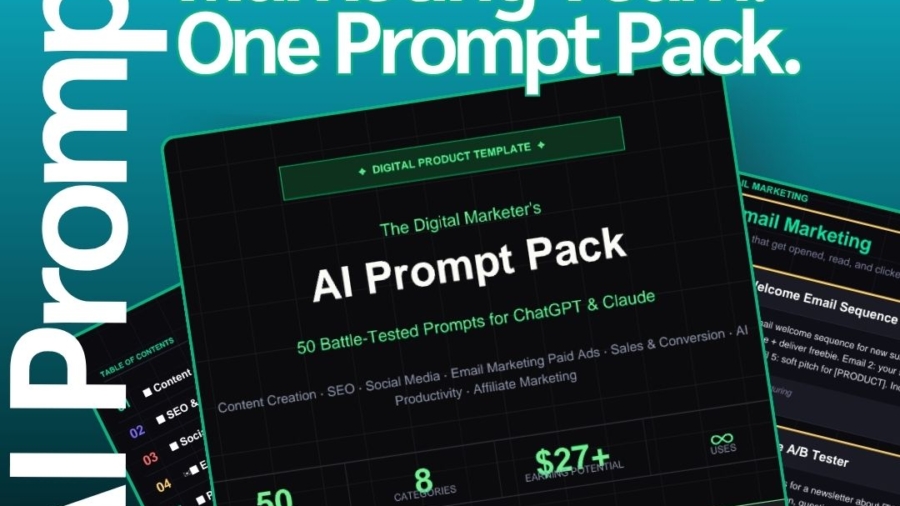
Get All 50 Prompts in One Place ( Oh 8 are Free! )
The five free prompts above are pulled from a complete pack of 50 battle-tested marketing prompts covering all eight categories: content creation, SEO, social media, email marketing, paid advertising, sales and conversion, AI productivity, and affiliate marketing.
Each prompt is plug-and-play, works with ChatGPT and Claude, and is designed to produce output you can actually use — not just something that sounds right but needs a full rewrite.
The Digital Marketer’s AI Prompt Pack
✦ NR23 Digital Marketing
The Digital Marketer’s AI Prompt Pack
50 battle-tested ChatGPT & Claude prompts for content creation, SEO, social media, email marketing, and paid ads — built for marketers who want results fast.
50
Prompts
8
Categories
∞
Uses
$27
One-time
Sample Prompts Included
Blog Post Outline Generator
🔥 HotContent
Create a detailed blog post outline for the topic: [TOPIC]. Target audience: [AUDIENCE]. Include an attention-grabbing H1, 5–7 H2 subheadings with 2–3 bullet points each, a compelling intro hook, and a strong CTA at the end. Optimize for the keyword: [KEYWORD].
Content Repurposing Machine
⚡ ProContent
Take this existing blog post: [PASTE CONTENT]. Repurpose it into: (1) a 280-character tweet, (2) a LinkedIn post with 3 key takeaways, (3) a 60-second video script, and (4) 5 Instagram carousel slide captions. Keep the core message consistent across all formats.
SEO Meta Description Writer
✦ NewSEO
Write 3 variations of SEO meta descriptions for a page about [TOPIC]. Each must be under 155 characters, include the primary keyword [KEYWORD], contain a clear benefit, and end with a subtle CTA. Target audience: [AUDIENCE].
Keyword Cluster Builder
⚡ ProSEO
I run a website about [NICHE]. Generate a keyword cluster around the seed keyword [KEYWORD]. Include: 5 short-tail keywords, 10 long-tail variations, 5 question-based keywords (who/what/how/why), and 3 buyer-intent keywords. Format as a table with estimated search intent (informational/commercial/transactional).
Viral Hook Formula
🔥 HotSocial
Write 10 scroll-stopping hooks for a social media post about [TOPIC]. Use these proven formats: curiosity gap, bold claim, contrarian take, “X mistakes” list, personal story opener, and surprising statistic. Platform: [PLATFORM]. Audience: [AUDIENCE].
30-Day Content Calendar
⚡ ProSocial
Create a 30-day social media content calendar for a [BUSINESS TYPE] in the [NICHE] niche. Include post themes, content types (reel, carousel, story, static), posting days, and a one-line caption idea for each. Mix: 40% educational, 30% engaging/fun, 20% promotional, 10% testimonials/social proof.
Welcome Email Sequence
🔥 HotEmail
Write a 5-email welcome sequence for new subscribers of [BRAND/BLOG NAME] in the [NICHE] space. Email 1: warm welcome + deliver freebie. Email 2: your story/why. Email 3: biggest value tip. Email 4: address #1 objection. Email 5: soft pitch for [PRODUCT/SERVICE]. Include subject lines for each email.
Facebook Ad Copy (3 Angles)
✦ NewAds
Write Facebook ad copy for [PRODUCT/SERVICE] targeting [AUDIENCE]. Create 3 versions using different angles: (1) Pain-point focused, (2) Desire/dream outcome focused, (3) Social proof/results focused. Each version needs: a hook (first line), body copy (3–4 sentences), and a CTA. Keep each under 150 words.
Get the Full Pack
One-Time Purchase
$20
Instant PDF
50 done-for-you AI prompts
8 marketing categories covered
Works with ChatGPT & Claude
Fill-in-the-blank variable format
Lifetime access + free updates
Whether you’re a solo blogger, a freelancer managing multiple clients, or an in-house marketer trying to do more with less, having the right prompts on hand is one of the highest-leverage investments you can make in your workflow.
Stop writing from scratch. Start with prompts that work.
In the vibrant and rapidly evolving economic landscape of Southern Africa, a silent revolution is underway, transforming how businesses connect with their customers and thrive in an increasingly digital world. This revolution is digital marketing, and it’s not just a trend, it’s the undeniable future of business in South Africa.
The Digital Pulse of Southern Africa: A Snapshot
The numbers speak for themselves, Southern Africa is experiencing an unprecedented surge in digital adoption, laying a fertile ground for businesses to flourish online. Consider these compelling statistics, with a particular focus on South Africa, a regional leader in digital penetration:
•Internet Penetration: As of early 2025, South Africa boasts a remarkable 50.8 million internet users, representing a 78.9% penetration rate . This figure saw a significant increase of 2.6 million users (+5.4%) from the previous year, indicating a continuous upward trajectory .
•Mobile Connectivity: The region is a mobile-first continent. South Africa alone recorded 124 million cellular mobile connections in early 2025, an astounding 193% of its total population . This highlights the critical role mobile devices play as the primary gateway to the internet for millions.
•Social Media Engagement: With 26.7 million social media user identities in South Africa, representing 41.5% of the population, platforms like Facebook, Instagram, and TikTok are not just for socialising; they are powerful marketplaces and community hubs .
•Unrivaled Online Usage: Southern Africans are highly engaged online. Data from 2025 reveals that South Africans have the highest average daily online usage globally, exceeding nine hours per day . This immense engagement presents an unparalleled opportunity for businesses to capture attention.
•E-commerce Boom: The shift to online shopping is accelerating. South Africa’s online retail sales surged by approximately 35% in 2024, reaching 96 billion rand and accounting for roughly 8% of all retail trade . This figure is projected to exceed $7.42 billion in 2025, underscoring the growing consumer confidence in online transactions .
Why Digital Marketing is the Future
Beyond the impressive statistics, several factors cement digital marketing’s position as the cornerstone of future business success in Southern Africa:
1. Unmatched Reach and Accessibility
Digital platforms break down geographical barriers, allowing businesses, regardless of their size, to reach a broader audience across cities, provinces, and even international borders but for many in Southern Africa, a mobile phone is their only computer, making mobile-first digital strategies not just an advantage, but a necessity.
2. Precision Targeting and Personalization
Unlike traditional advertising, digital marketing allows for hyper-targeted campaigns. Businesses can reach specific demographics, interests, and behaviors, ensuring their message resonates with the most receptive audience. The rise of AI-powered personalization is further refining this, enabling tailored customer experiences that build loyalty and drive conversions .
3. Measurable Results and ROI
One of digital marketing’s most compelling advantages is its measurability. Every click, impression, and conversion can be tracked and analyzed, providing invaluable insights into campaign performance. This data-driven approach allows businesses to optimize their strategies in real-time, ensuring a higher return on investment (ROI) compared to less quantifiable traditional methods.
4. Cost-Effectiveness for All
Digital marketing offers a significantly lower barrier to entry for small and medium-sized enterprises (SMEs). With options ranging from affordable social media advertising to organic content strategies, businesses can compete effectively without the hefty budgets required for traditional media like television or print.
5. Engaging Content Formats
From the surge in video marketing and short-form content (think TikTok and Instagram Reels) to immersive content marketing and storytelling, digital platforms offer diverse and engaging ways to connect with consumers . This allows businesses to build brand narratives that resonate deeply with a young, tech-savvy population (median age in South Africa is 28.7) .
6. The Rise of Social Commerce
Social media is no longer just for connecting, it’s for buying. Social commerce, where consumers can discover and purchase products directly within social media platforms, is gaining significant traction, especially among younger demographics . This seamless integration of discovery and transaction is a game-changer for retail.
Navigating the Challenges, Embracing the Opportunity
While the digital future is bright, challenges remain. Economic pressures, infrastructure inconsistencies like load shedding, and a persistent digital skills gap require strategic navigation . However, these challenges also present opportunities for innovation and growth for businesses and individuals willing to invest in digital literacy and robust online strategies.
Conclusion: The Digital Imperative
For businesses in Southern Africa, embracing digital marketing is no longer optional; it’s an imperative for survival and growth. The region’s rapidly expanding internet access, mobile-first culture, and highly engaged online population create an unparalleled environment for digital strategies to thrive. By understanding and leveraging these trends, businesses can unlock new markets, build stronger customer relationships, and secure their place in the future of Southern African commerce.
If you have made it this far, as usual we recommend a book worth the read below:
You need your content to appear where people now start searches: in AI-generated answers and summaries. Generative Engine Optimization (GEO) helps you make content machine-readable, directly answer common queries, and build credibility so AI systems cite your site, which increases visibility and referral traffic. This post shows how GEO differs from traditional SEO and what matters most for AI-driven discovery.
You will learn practical content strategies, technical steps to make data extractable, and metrics that show whether AI agents use your content. Expect clear guidance on crafting answer-first content, structuring pages for extraction, measuring AI mentions, and preparing for evolving AI search behavior.
GEO focuses on making your content directly usable by AI systems so those systems cite or incorporate it into answers. It emphasizes clarity, authority, and structured data to increase the chance that a generative engine will pull your information into a response.
Definition and Core Principles
Generative Engine Optimization (GEO) is the discipline of structuring and publishing content so generative AI systems can accurately find, interpret, and cite it in conversational answers. You optimize for being referenced, not just ranked, by presenting concise facts, clear attributions, and machine-readable signals.
Key principles to apply:
Answer-first writing: lead with direct answers to common questions.
Source transparency: include verifiable citations, timestamps, and author credentials.
Structure for parsing: use headings, lists, tables, and schema markup so models can extract facts reliably.
Topical authority: cover a topic comprehensively across multiple pages or documents to build a defensible signal for AI selection.
Differences Between GEO and Traditional SEO
GEO and SEO share goals, but their mechanics diverge. SEO targets search result rankings and click-throughs; GEO targets inclusion inside an AI-generated response. That changes what you track and optimize.
For SEO you prioritize keywords, backlinks, and CTR metrics. For GEO you emphasize:
Clear answer sentences that AI can quote verbatim.
Embedded metadata (schema.org, JSON-LD) and authoritative citations.
Consistency across content to reduce contradictory facts. You should still use SEO fundamentals, but you must add explicit signals that help LLMs verify and surface your content within their outputs.
Role of Large Language Models in AI Search
Large language models (LLMs) serve as the reasoning layer that transforms indexed content into conversational answers. They ingest text, weigh evidence, and generate responses that may cite underlying sources.
You need to know how LLM behavior affects visibility:
LLMs prefer concise, factual statements with clear provenance when choosing citations.
Training and retrieval systems combine cached knowledge with live retrieval; your content must be retrievable and trustworthy.
Retrieval-augmented generation (RAG) systems pull passages by relevance; use unique phrasing and strong headings so your passages rank in retrieval. Design content to be a clean, verifiable unit that an LLM can copy, paraphrase, and cite with confidence.
Evolution of Search Algorithms in the Age of AI
Search has shifted from index-and-rank to retrieve-and-generate workflows. Algorithm design now blends traditional indexing, neural retrieval, and generative synthesis.
Practical effects for your content strategy:
Emphasize freshness and explicit update dates because generative answers may prefer recent sources.
Provide modular, standalone passages (FAQ items, bullet lists, micro-guides) that retrieval systems can surface as single evidence units.
Monitor new signals beyond links, such as citation frequency in other AI outputs, API-level usage, and structured data adoption. Adaptation matters: maintain canonical pages, create authoritative explainers, and publish machine-readable metadata so evolving AI pipelines can reliably find and use your content.
AI Search Visibility Fundamentals
AI systems prioritize accurate, well-structured, and verifiable content that directly answers user intents. You should focus on source signals, clear factual claims, and formats that LLMs can parse reliably.
How AI Search Platforms Index Content
AI platforms build indices from mixed sources: web pages, structured datasets, knowledge graphs, and publisher APIs. You should ensure your canonical pages are crawlable, use consistent canonical tags, and expose content through sitemaps or publisher feeds so ingestion systems can find authoritative copies.
Model pipelines also extract structured elements—schema.org markup, table CSVs, and JSON-LD, so add explicit metadata for product details, author, publish date, and identifiers. Systems sometimes re-crawl high-value sources more frequently; keep critical facts updated and correct to avoid stale answers.
Key Ranking Factors for Generative AI Engines
Generative engines weigh trust signals over simple keyword matches. You should emphasize:
Authority: citations from recognized domains, author credentials, and publisher reputation.
Accuracy: verifiable facts with dates and primary-source links.
Clarity of intent match: concise answers that satisfy common queries directly.
Freshness: update timestamps for time-sensitive topics.
Also consider technical signals: structured data presence, page speed, and content accessibility. Provide canonical citations and machine-readable provenance so models can confidently attribute your content.
Disclaimer: Please note links on this post are affiliate links to Amazon.com, whereby if you make a purchase we might earn commission from the Amazon associates program.
You juggle many tasks and need tools that save time and bring customers. Use platforms that automate posts, track who visits your site, manage email campaigns, and measure results so you can focus on what grows your business. The right mix of simple, affordable marketing tools will let you reach more people, work faster, and make smarter decisions.
You don’t need every tool; pick a few that match your goals and skill level, then connect them so data flows between systems. Start small, test what moves the needle, and scale tools that actually drive sales or leads.
Key Takeaways
Pick a few easy tools that match your business goals.
Connect tools so data and tasks flow smoothly.
Test and scale tools based on real results.
Understanding Digital Marketing Tools
Digital marketing tools help you reach customers online, track results, and automate repetitive work. They let you publish content, find the right audience, measure performance, and manage leads without hiring extra staff.
Definition and Importance
Digital marketing tools are software or platforms that help you create, distribute, and measure online marketing. You use them to build websites, schedule social posts, send email campaigns, run ads, and track visitor behavior.
They matter because they save time and reduce mistakes. For example, an email tool can personalize messages to hundreds of contacts, and an analytics tool shows which pages drive sales. That clarity helps you decide where to spend money and effort.
Use tools that match your skills and budget. Basic options cover website hosting, email, and social scheduling. More advanced tools add SEO, paid ad management, marketing automation, and CRM features. Choose tools that integrate so data flows between them.
Key Benefits for Small Businesses
Digital tools lower costs compared with traditional marketing. You can run targeted ads for specific zip codes or audience interests, which avoids wasting budget on broad, expensive campaigns.
They increase efficiency by automating tasks. Examples: schedule social posts for a month, auto-send welcome emails, and route new leads to a salesperson instantly. That frees time for product work or customer service.
Tools provide measurable results. You track clicks, conversions, and revenue from each campaign. That data helps you repeat what works and stop what doesn’t. You also gain faster customer insights—who buys, when, and from which channel.
Types of Digital Marketing Tools
Focus on core categories first: Website builders (WordPress, Wix), Email marketing (Mailchimp, Sendinblue), Social media schedulers (Buffer, Hootsuite), and Analytics (Google Analytics, Plausible).
Add specialized tools as you grow:
SEO tools: keyword research, rank tracking, and site audits.
Paid ads tools: campaign management for Google and Meta.
Design tools: quick graphics and templates for posts and ads.
CRM/automation: manage contacts, segment audiences, and trigger workflows.
Use a simple stack that integrates: one website, one email service, one analytics tool, and one social scheduler. That setup keeps data centralized and reduces time spent moving information between apps.
Essential Tools for Social Media Marketing
Use tools that help you schedule posts, measure results, and monitor conversations. Pick platforms that fit your budget, support the networks you use, and give clear data you can act on.
Content Scheduling Platforms
Content schedulers let you plan posts, queue content, and publish across multiple networks without manual posting. Look for platforms that support the exact channels you use (Facebook, Instagram, X, LinkedIn, TikTok), offer a visual calendar, and allow team roles so you can approve content before it posts.
Key features to compare:
Post types: native image, video, carousel, stories, reels.
Queue & calendar: drag-and-drop scheduling and recurring posts.
Collaboration: drafts, approvals, and user roles.
Media library: store brand assets and captions.
Draft & preview: see how posts will look on each network.
If you run ads, choose a scheduler that integrates with ad tools or has boosted-post features. Free plans work for simple needs, but paid tiers add analytics, more profiles, and automation.
Analytics and Reporting Tools
Analytics tools show what posts perform and why. Choose one that tracks engagement rate, reach, saves, clicks, and follower growth across all platforms you use. You need clear dashboards and exportable reports for monthly reviews and for sharing with stakeholders.
Look for these capabilities:
Cross-platform reporting: combine metrics from different networks.
Custom dashboards: focus on KPIs like conversion or ROI.
Post-level insights: identify top-performing content and best post times.
Audience data: demographics and active hours.
Export options: CSV, PDF, or scheduled email reports.
Use A/B testing and compare content types (video vs. image). Good analytics help you cut low-performing content and double down on what drives website visits or sales.
Social Listening Solutions
Social listening finds brand mentions, competitor moves, and trending topics in real time. Use listening tools to catch customer complaints, discover product feedback, and spot content ideas before they go mainstream.
Important listening features:
Keyword and hashtag tracking: monitor brand names, product SKUs, and campaign tags.
Sentiment analysis: surface positive, neutral, and negative mentions.
Competitive benchmarking: compare share of voice and engagement.
Alerting: receive real-time notifications for spikes or crisis signals.
Filtering: refine results by location, language, or platform.
Pair listening with your customer service process so you respond quickly to issues. That reduces negative exposure and creates opportunities to turn mentions into leads.
Email Marketing Solutions
You can use email to sell products, keep customers informed, and build loyalty. Pick tools that fit your budget, list size, and the time you have to manage campaigns.
Newsletter Platforms
Newsletter platforms help you design and send regular emails to your list. Look for drag-and-drop editors, mobile-ready templates, and clear analytics like open and click rates. Platforms such as Mailchimp, Zoho Campaigns, and others give free tiers for small lists and scale as you grow.
Use segmentation to send relevant content to different groups. For example, separate new subscribers from repeat buyers to change message tone and offers. Also check deliverability rates and unsubscribe tools; good platforms provide A/B testing and simple list hygiene options to reduce bounces and spam complaints.
Pricing matters: many charge by subscribers or sends. Choose a plan that matches your growth path so you don’t face sudden cost jumps.
Automation Platforms
Automation platforms let you send triggered emails based on actions like purchases, sign-ups, or cart abandonment. Set up welcome series, post-purchase follow-ups, and re-engagement flows to save time and increase revenue without manual work.
Look for visual workflow builders that show triggers, delays, and conditions. Integrations with your e-commerce store, CRM, or booking system matter for accurate triggers and data sharing. Also check the platform’s reporting on revenue per workflow, not just opens and clicks, so you can measure ROI.
Choose tools that support multichannel steps (email + SMS) if you plan to reach customers beyond email. Start with a few high-impact automations and expand as you learn what drives conversions.
Personalization Tools
Personalization tools let you tailor content to individual subscribers using data like name, purchase history, and browsing behavior. Basic personalization includes name fields and dynamic content blocks. Advanced tools use behavioral data to recommend products or change offers in real time.
Use personalization to increase relevance: show recommended items, local store info, or timing based on past purchases. Keep privacy and consent in mind; only use data you collected lawfully and let subscribers control preferences. Test personalized elements with A/B tests to make sure they improve results.
Integrations with your CRM and analytics stack amplify personalization. Even small stores can use simple product recommendation widgets or merge tags to make emails feel more relevant.
Search Engine Optimization (SEO) Tools
SEO tools help you find the right keywords, fix on-page issues, and watch competitors’ moves. Use them to pick target keywords, improve page content and structure, and track rivals’ rankings and backlinks.
Keyword Research Tools
Keyword tools show real search volume, competition, and related phrases you can target. Start with a list of seed terms tied to your products or services. Use the tool to expand that list with long-tail phrases customers actually search.
Look for metrics like monthly searches, keyword difficulty, and intent labels (informational, commercial, transactional). These help you choose low-competition phrases you can realistically rank for. Save keyword groups for pages and map primary vs. secondary keywords to content and meta tags.
Practical features to use: autocomplete suggestions, question filters, and SERP preview. Export keyword lists to CSV and track rankings over time so you know which keywords are driving traffic.
On-Page SEO Optimizers
On-page tools scan your pages and give actionable fixes for titles, headers, meta descriptions, and content gaps. Run a page audit to catch missing meta tags, broken internal links, slow images, or thin content that reduces ranking chances.
Use content suggestions that match your target keyword’s intent, like adding FAQs, step-by-step instructions, or local terms. Implement schema markup for reviews, products, or events to improve how search engines display your listings.
Prioritize fixes by impact: title tags and meta descriptions first, then content depth, then technical items like image compression and mobile layout. Re-audit after changes to confirm improvements.
Competitor Analysis Solutions
Competitor tools reveal which keywords rivals rank for, where their backlinks come from, and which pages drive their traffic. Enter a competitor domain to see top-performing pages, ranking keywords, and estimated organic traffic trends.
Use backlink reports to find sites that link to competitors but not to you. Outreach those domains with better content or partnership pitches. Track new keyword wins and losses to spot tactic changes and content gaps you can exploit.
Set up alerts for competitor moves like new landing pages, big traffic spikes, or sudden backlink gains. That helps you respond quickly with content updates or targeted promotions.
Content Marketing Platforms
You need tools that help you write, store, and share content efficiently. Pick platforms that match your team size, budget, and the types of content you publish most.
Content Creation Tools
Content creation tools help you produce blog posts, graphics, videos, and social posts faster. Use a mix of a text editor, a design app, and a simple video editor. For writing, choose tools with real-time collaboration and basic SEO suggestions so you can draft and optimize in one place. For visuals, pick a template-based graphic tool that offers brand kits and export options for web and social sizes. For short videos, use a mobile-friendly editor with easy trimming, captions, and aspect-ratio presets.
Key features to look for:
Collaboration and version history
Built-in SEO or readability checks
Pre-made templates and brand asset storage
Export formats for web, social, and email
Content Management Systems
A CMS stores and publishes your web content. Choose one that matches your technical skill and control needs. If you want low setup work, use a hosted CMS with themes and plugins. If you need custom features or higher performance, use a self-hosted CMS on your own server. Make sure the CMS supports URL control, meta tags, easy image handling, and scheduling. Also confirm it integrates with analytics, marketing automation, and your CRM.
Practical CMS checklist:
Easy content editing and scheduling
SEO fields (title, meta, canonical)
Plugin or app ecosystem
Backup and security options
Content Distribution Platforms
Distribution platforms get your content in front of audiences. Use social schedulers to post across networks at optimal times. Use an email platform to send newsletters, segment lists, and automate welcome or follow-up sequences. For earned reach, use a content discovery or PR tool to pitch outlets and track pickup. For paid reach, use social and search ad managers that let you boost posts, target audiences, and measure conversions.
Distribution tools should offer:
Multi-channel scheduling and a content calendar
Audience targeting and list segmentation
Performance reporting and A/B testing
Easy integration with your CMS and analytics system
Customer Relationship Management (CRM) Tools
CRM tools help you organize contacts, track sales steps, and automate follow-ups. They should save time, show where deals stand, and connect with email and calendars.
Lead Tracking Solutions
Lead tracking shows who contacted you, where they came from, and what stage they’re in. Use lead scoring to rank prospects by actions like website visits, email opens, or form submissions. That lets you push hot leads to sales and let cold leads receive nurture campaigns.
Look for visual pipelines with drag-and-drop stages so you can move deals from “contacted” to “proposal” quickly. Make sure the CRM logs activity automatically—calls, emails, and meetings—so you don’t lose context when you follow up. Good systems let you filter leads by source, value, or last contact date so you can prioritize daily outreach.
Automation rules matter: assign leads to reps by territory or round-robin, send instant thank-you emails, and set reminders for stalled deals. Check reporting that shows conversion rates by campaign and average deal age. Those metrics tell you which lead sources actually close.
Email Integration Features
Email integration syncs your inbox with contact records so every message links to the right customer. Choose CRMs that support two-way sync with Gmail or Outlook to log sent and received messages automatically. That keeps communication history in one place.
Templates and sequencing speed up repetitive outreach. Use merge fields to personalize at scale, and set sequence delays so emails feel natural. Also look for open and click tracking so you can see which messages engage prospects and which need changing.
Calendar sync and meeting links cut scheduling friction. One-click meeting booking that writes back to the CRM saves time and reduces no-shows. Finally, ensure the CRM lets you create shared team inboxes and set permissions so your team collaborates without exposing private threads.
Paid Advertising Management Tools
Paid ads let you reach exact audiences, control spend, and measure results. You’ll use platforms to buy clicks and tools to track performance so you can cut costs and boost conversions.
Pay-Per-Click (PPC) Platforms
PPC platforms let you bid for ad placement on search engines, social sites, and networks. Google Ads and Microsoft Advertising cover search and display; Meta Ads serves Facebook and Instagram. Choose platforms based on where your customers spend time and the format you need (search, display, shopping, or video).
Set clear goals—sales, leads, or traffic—and pick campaign types that match those goals. Use keyword match types, negative keywords, and audience targeting to reduce wasted spend. Test ad copy, headlines, and landing pages with A/B tests. Monitor cost-per-click (CPC), click-through rate (CTR), and conversion rate daily when campaigns are new, then move to weekly checks.
Budget smart: start small, raise spend on top performers, and pause underperformers. Use automated bid strategies (target CPA, ROAS) once you have conversion data. Keep your account organized with campaigns, ad groups, and naming conventions.
Ad Tracking and Analytics
Track each campaign with conversion pixels, UTM tags, and a tag manager (like Google Tag Manager). Pixels capture on-site actions; UTMs tell you which ad, campaign, and creative drove the visit.
Focus on these metrics:
Conversions (sales, signups)
Cost per acquisition (CPA)
Return on ad spend (ROAS)
Lifetime value (LTV)
Use attribution settings to match conversions to the right touchpoints. Start with last-click for simplicity, then test time-decay or data-driven models as you collect data.
Connect your ad accounts to Google Analytics or a dashboard tool to combine data. Automate reports for daily spend and weekly performance trends. This helps you spot rising CPCs, creative fatigue, or audience shifts fast so you can reallocate budget.
Website and Landing Page Builders
Pick tools that let you build pages fast, test what works, and make sure pages look right on phones. Focus on editors that match your skill level, templates that fit your brand, and testing features that measure real visitor behavior.
Drag-and-Drop Page Editors
Drag-and-drop editors let you design pages without coding. You place elements like headings, images, forms, and buttons directly on the canvas. This speeds up page creation and makes it easy to match your brand colors and fonts.
Look for these features:
Pre-built templates for offers, lead magnets, and product pages.
Ready-made blocks for hero sections, testimonials, and pricing tables.
Global style controls to apply fonts and colors site-wide.
Choose an editor that exports clean HTML or integrates with your CMS and email tools. That avoids lock-in and helps with SEO. If you run ads, pick templates optimized for conversions to cut setup time.
Mobile Optimization Tools
Most visitors use mobile devices, so your pages must load fast and display correctly on small screens. Mobile tools show a preview and let you hide or reorder elements for phones. They also let you adjust padding, font sizes, and image scaling per device.
Key items to check:
Auto-responsive templates that rearrange content for narrow screens.
Image compression and lazy loading to reduce page weight.
AMP or mobile-specific page options if you target search ads.
Test pages on real devices and with speed tools. Small tweaks—reducing large images, simplifying hero sections, or shortening forms—often give the biggest improvement in mobile conversion rates.
A/B Testing Features
A/B testing helps you compare two versions of a page to see which converts better. Good builders include split testing that handles URL variations, visitor allocation, and statistical reporting. You should be able to test headlines, images, button text, and form fields.
Make tests simple:
Change one element at a time for clear results.
Run tests until you reach a reliable sample size.
Track primary metrics like signups or purchases and secondary metrics like bounce rate.
Look for integrations with analytics and ad platforms so you can tie test results to traffic sources. Automated winner selection and easy cloning of variations save time and let you roll out improvements quickly.
Analytics and Data Tracking
Track site speed, visitor behavior, and goal completions. Use tools that show where users drop off, which pages slow load, and which campaigns drive sales so you can fix the biggest leaks fast.
Website Performance Tools
You should monitor page load time, Core Web Vitals, and mobile responsiveness every week. Tools like Google PageSpeed Insights and WebPageTest give lab and field data on Largest Contentful Paint (LCP), First Input Delay (FID), and Cumulative Layout Shift (CLS). Focus on LCP under 2.5s and CLS below 0.1 for better user experience.
Use synthetic tests for baseline speed and real-user monitoring (RUM) for actual visitor experience. Check server response, image sizes, and third-party scripts. Create a short action list: compress images, enable caching, and defer noncritical JavaScript.
Conversion Tracking
Set clear goals before you track: purchases, leads, newsletter signups, or phone calls. Use event-based tracking in Google Analytics 4 or your CMS to record button clicks, form submissions, and checkout steps. Map each goal to a revenue or business metric so you can measure value per conversion.
Validate tracking with a testing tool (e.g., GA4 DebugView or Tag Assistant). Track offline conversions too—match phone leads or in-store visits back to campaigns when possible. Use UTM tags on campaign links to tie conversions to email, social, or paid ads.
Reporting Dashboards
Build dashboards that answer one question per widget: “How many sales came from paid search this week?” Use tools like Looker Studio, Power BI, or your analytics platform’s built-in dashboards. Combine traffic, conversion rate, and revenue in the same view so you see cause and effect.
Include these key widgets:
Sessions by source/medium
Conversion rate by landing page
Revenue per campaign
Top pages by exits
Update dashboards daily for active campaigns and weekly for strategic reviews. Keep visuals simple: line charts for trends, bar charts for comparisons, and tables for raw values.
Collaboration and Productivity Tools
You need tools that keep tasks organized, deadlines visible, and conversations in one place. Pick solutions that match your team size and the way you work day to day.
Project Management Solutions
Choose a project tool that shows tasks, owners, and due dates at a glance. Look for Kanban boards for visual workflows, Gantt charts for timeline planning, and recurring task features for work you repeat. Prioritize integrations with tools you already use, like Google Workspace, Slack, or your CRM, to avoid manual updates.
Set up templates for common projects to save time. Use labels, milestones, and custom fields to filter work by client, priority, or revenue. Keep permissions simple: limit edit rights to project leads and use comment-only access for stakeholders. Track time on tasks if you bill clients or measure team capacity.
Recommended features checklist:
Kanban and list views
Calendar and Gantt options
Reusable templates
Time tracking and reporting
Integrations with email, file storage, and invoicing for Digital Marketing.
Team Communication Platforms
Pick a platform that separates quick chat, focused threads, and file sharing. Use channels or groups for teams, projects, and clients so conversations stay on topic. Enable searchable message history so you can find decisions, links, and files later.
Set clear rules: use direct messages for quick back-and-forth, channels for project work, and threads for specific topics. Connect the platform to your project tool so task alerts appear where your team already talks. Turn off noncritical notifications during deep work hours to keep productivity high.
Look for these essentials:
Persistent channels and threaded replies
File sharing with preview and version history
Search and message pinning
Cross-tool notifications and app integrations
Mobile and desktop apps with stable performance
Integrating and Automating Digital Marketing Tools
You can cut manual work and keep data accurate by linking your ads, email, analytics, CRM, and content tools. Focus on automating repeat tasks and setting clear data flows so campaigns run without constant manual updates.
Workflow Automation
Use workflow automation to move leads, trigger messages, and update records automatically. For example, set a rule that when a lead submits a form, they get a welcome email, a CRM record is created, and a task is assigned to a sales rep. This reduces delays and keeps follow-up consistent.
Choose automation that supports conditional logic (if/then), time delays, and multi-step actions. Test each workflow with sample data to avoid email loops or duplicate records. Track key metrics like lead-to-opportunity time and email open rates to see if automation improves outcomes.
Common automation tasks:
Lead routing and scoring
Email drip campaigns
Abandoned cart recovery
Social post scheduling after blog publish
Document each workflow in a simple map so your team can update it without guessing.
Integration Platforms
Integration platforms connect tools that don’t natively talk to each other. Pick platforms that offer prebuilt connectors for your CRM, email, analytics, and e-commerce systems. Look for these features:
Drag-and-drop builder for quick setup
Error handling and retry options
Field mapping and data transformation
Real-time sync or near-real-time scheduling
Compare platforms by connector library and price. Start with critical flows: contacts, orders, and campaign metrics. Use field mapping to keep IDs and timestamps consistent across systems. Monitor the integration logs weekly for failures and set alerts for major sync errors.
Quick checklist for choosing a platform:
Supports your core apps (CRM, email, site)
Easy field mapping and data validation
Clear pricing for volume and tasks
Reliable error notifications and retry logic
Choosing the Right Digital Marketing Tools for Your Business
Start by listing your top goals. Do you need more sales, better social engagement, or faster content creation? Clear goals help you match tools to the tasks that matter most.
Next, check how the tool fits your budget and team skills. Look for free trials and scalable pricing so you can grow without surprise costs. Choose tools with simple interfaces if your team has limited technical experience.
Evaluate features against real needs. Prioritize tools that automate repetitive work, provide useful analytics, or improve customer communication. Avoid buying feature-heavy platforms you won’t use.
Use this quick comparison checklist to decide:
Must-haves: essential features you need today
Nice-to-haves: features that help but aren’t urgent
Integration: works with your website, CRM, or other tools
Support & learning: good docs, tutorials, and customer service
Test before committing. Run a short pilot with one or two tools and measure results using clear KPIs like traffic, leads, or conversion rate. Your pilot will reveal usability issues and real impact.
Finally, pick tools that play well together. Choose platforms with solid integrations or open APIs to avoid manual work and data silos. That keeps your marketing efficient and easier to manage.
Trends and Innovations in Digital Marketing Tools
You will see AI-powered tools become common in content, ads, and analytics. These tools help you create copy, generate images, and predict customer behavior faster than manual methods. Use them to save time, but always check outputs for accuracy.
Short-form video and visual-first platforms keep growing. Tools that help you edit, schedule, and repurpose video content make it easier to reach audiences on mobile. Focus on clear, short messages that match platform formats.
Personalization and advanced segmentation get better with data tools. You can target messages based on behavior, purchase history, and preferences. This boosts relevance and can improve open and conversion rates.
Privacy and first-party data tools matter more now. You should collect customer data ethically and use tools that respect consent rules. This reduces risk and builds trust with your audience.
Marketing automation and integration simplify workflows. You can connect email, CRM, social, and analytics so tasks flow automatically. That saves time and keeps campaigns consistent.
Here’s a quick comparison of emerging tool types:
Tool type
What it helps you do
When to use it
AI content & creative
Generate drafts, images, video edits
When you need speed and ideas
Short-form video editors
Create platform-ready clips
For social and mobile audiences
Customer data platforms
Unify customer profiles
To personalize at scale
Privacy & consent tools
Manage permissions and compliance
When handling user data
Adopt new tools gradually. Test small, measure results, and keep the human review step in your process.
In today’s digital-first world, the question for small business owners is no longer if they need a website, but rather how quickly they can get one. As we move further into 2026, a professionally designed website is not just a digital brochure, it’s the cornerstone of your business’s online presence, a 24/7 salesperson, and a powerful engine for growth. This guide will explore the essential benefits of having a website for your small business and how to leverage it to thrive in the age of AI-powered search.
The Unwavering Importance of a Professional Website
While social media platforms are valuable for engaging with customers, they are ultimately “rented land.” You don’t own your social media profiles, and you’re subject to the whims of algorithm changes and platform policies. A website, on the other hand, is your digital property. It’s an asset that you control, a central hub for all your marketing efforts, and a space where you can build a lasting brand identity.
Building Trust and Credibility in the Digital Age
A recent study found that a significant majority of consumers expect businesses to have a website. A well-designed and informative website instantly builds trust and credibility with potential customers. It signals that you are a legitimate and professional operation, which is crucial for converting prospects into loyal patrons. Without a website, you risk being perceived as outdated or untrustworthy, sending potential customers straight to your competitors.
Your 24/7 Sales and Marketing Engine
Imagine having a salesperson who works around the clock, never takes a vacation, and can speak to thousands of customers at once. That’s what a website does for your business. It’s a tireless advocate that provides essential information, answers frequently asked questions, and even generates leads while you sleep. By integrating features like online booking, e-commerce functionality, and contact forms, your website can become a powerful tool for automating sales and customer service processes.
Dominating Local Search and Beyond
For most small businesses, the local market is the primary source of revenue. A website is the most effective tool for capturing local customers who are actively searching for the products and services you offer. By implementing a robust local SEO strategy, you can ensure that your business appears at the top of Google’s search results when potential customers in your area are looking for a solution.
Local SEO Tactic
Description
Impact on Small Business
Google Business Profile
A free profile on Google that allows you to manage your online presence across Google Search and Maps.
Increases visibility in local search results and provides customers with essential information like your address, phone number, and hours of operation.
Local Keywords
Keywords that include a specific geographic location (e.g., “best pizza in Pretoria”).
Attracts highly qualified customers who are looking for products or services in your area.
Online Reviews
Customer reviews on platforms like Google, Yelp, and Facebook.
Builds social proof and trust, and can significantly impact your local search rankings.
Future-Proofing Your Business with AI and GEO
The rise of AI-powered search engines is changing the way consumers discover and interact with businesses online. Generative Engine Optimization (GEO) is the practice of optimizing your website content to be cited and featured in AI-generated search results. By creating high-quality, informative, and well-structured content, you can position your business as an authority in your industry and increase your chances of being recommended by AI assistants.
“In the age of AI, a website is no longer just a collection of pages; it’s a structured data asset that can be used to train and inform AI models. Businesses that invest in creating high-quality content will have a significant advantage in the new era of search.”
Getting Started: Your Path to a Powerful Online Presence
Creating a professional and effective website doesn’t have to be a daunting task. Whether you choose to work with a web design agency or use a modern website builder, the most important step is to get started. A well-planned website is a long-term investment that will pay dividends for years to come, helping you to attract new customers, grow your brand, and build a thriving business in the digital age.
Need to start from scratch? We can help! Strategy, Website, Hosting and Marketing. Your AIO Digital Partner.
In the dynamic world of content creation, having the right gear can make all the difference. Whether you’re a seasoned YouTuber, an adventurous travel vlogger, or a budding filmmaker, a high-quality camera is your most essential tool. This guide dives into five exceptional vlogging cameras, perfect for capturing stunning footage and taking your content to the next level. We’ll explore their key features, ideal use cases, and why they stand out in a crowded market.
1. Xtra Muse: The Pocket Powerhouse for Cinematic Vlogging
The Xtra Muse Vlogging Camera emerges as a strong contender for creators seeking professional-grade results in a compact form factor. This pocket-sized marvel is engineered for cinematic storytelling, making it an excellent choice for daily vlogs, travel adventures, and spontaneous captures.
Key Features:
•1-inch CMOS Sensor: Delivers superior image quality, especially in challenging lighting conditions, ensuring your footage is crisp and vibrant.
•4K/120fps Video: Capture breathtaking slow-motion shots and ultra-high-definition video, adding a professional touch to your productions.
•3-Axis Gimbal Stabilizer: Guarantees buttery-smooth footage, eliminating shakes and jitters even during dynamic movements.
•Fast Focusing & Face/Object Tracking: Keeps your subjects sharp and in focus, perfect for active vlogging and ensuring you’re always the star of your show.
Why it’s great for content creators: The Xtra Muse is designed for creators who prioritize portability without compromising on video quality or stabilization. Its intelligent tracking features make solo vlogging effortless, allowing you to concentrate on your narrative.
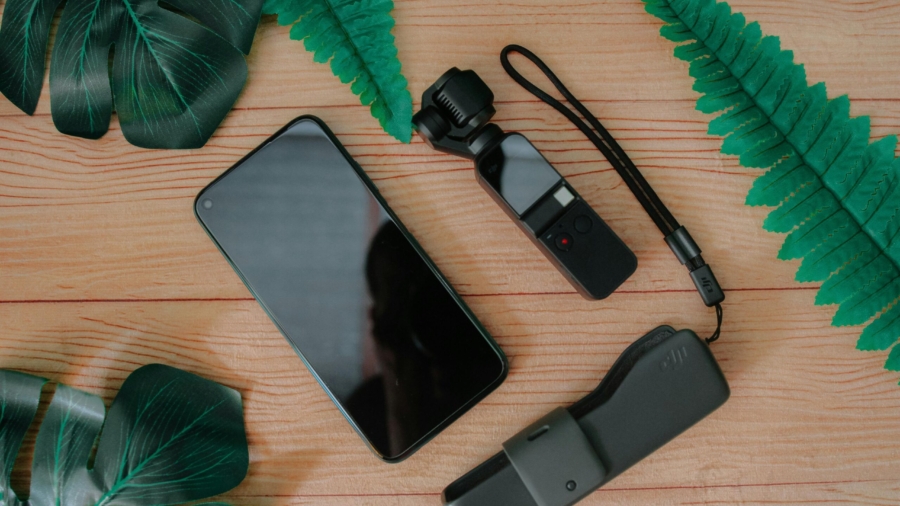
2. DJI Osmo Pocket 3: The Evolution of Portable Vlogging
DJI continues to innovate with the DJI Osmo Pocket 3, building upon the success of its predecessors with enhanced features tailored for the modern vlogger. This camera is a testament to how powerful small devices can be, offering an intuitive experience for capturing high-quality video.
Key Features:
•1-inch CMOS Sensor: Similar to the Xtra Muse, this larger sensor significantly improves low-light performance and dynamic range.
•4K/120fps Vlog Camera: Provides stunning detail and the flexibility for dramatic slow-motion effects.
•3-Axis Stabilization: DJI’s renowned gimbal technology ensures incredibly stable footage, even when you’re on the move.
•Fast Focusing & Face/Object Tracking: Advanced autofocus systems keep your subjects sharp, making it ideal for dynamic vlogging scenarios.
•Rotatable Touchscreen: A standout feature, allowing for quick adjustments and easy framing, enhancing the user experience for solo creators.
Why it’s great for content creators: The Osmo Pocket 3 is perfect for YouTubers and vloggers who need a reliable, high-performance camera that’s easy to carry and operate. The rotatable screen is a game-changer for self-shooting.
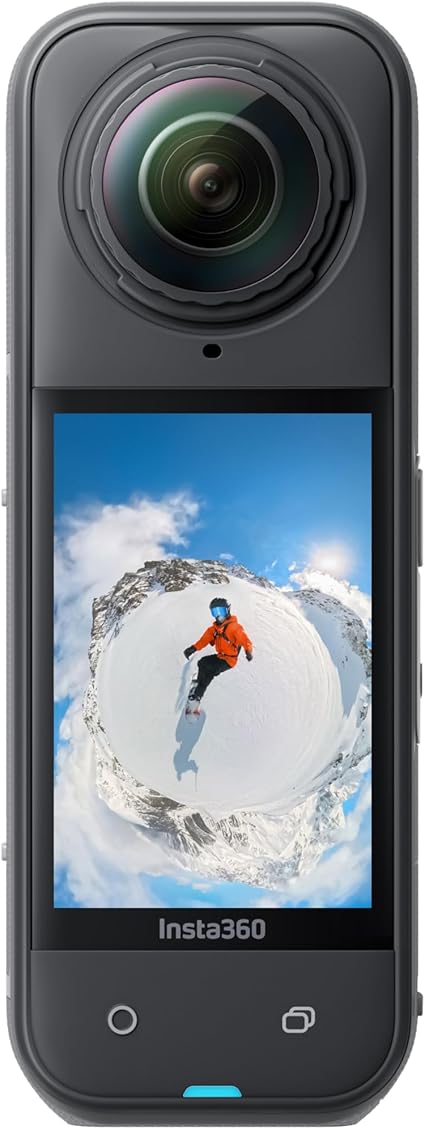
3. Insta360 X5: Immerse Your Audience with 8K 360°
For creators looking to push the boundaries of immersive storytelling, the Insta360 X5 is an unparalleled choice. This 8K 360° action camera redefines how you capture and share experiences, offering a unique perspective that traditional cameras cannot.
Key Features:
•Waterproof 8K 360° Action Camera: Capture every angle in stunning 8K resolution, perfect for action sports, travel, and unique cinematic shots.
•Leading Low Light Performance: Ensures vibrant and detailed footage even in challenging lighting conditions.
•Invisible Selfie Stick Effect: Magically removes the selfie stick from your footage, creating incredible third-person perspectives.
•Rugged and Replaceable Lens: Built to withstand the rigors of adventure, with easily replaceable lenses for peace of mind.
•Triple AI Chip Design: Powers advanced features like FlowState Stabilization and intelligent editing, simplifying complex shots.
Why it’s great for content creators: The Insta360 X5 is a must-have for adventure vloggers, immersive storytellers, and anyone wanting to create truly unique and engaging content that stands out. The ability to reframe shots after filming offers immense creative freedom.
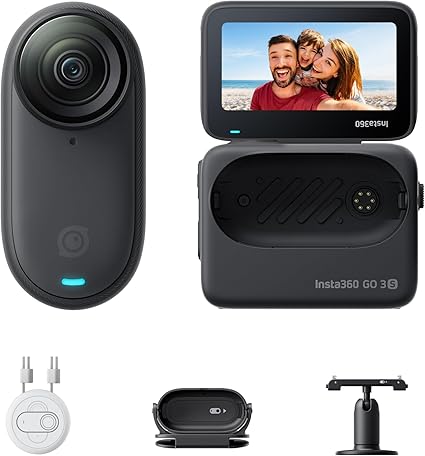
The Insta360 GO 3S is the epitome of discreet and versatile content creation. This tiny portable vlogging camera is designed for capturing unique perspectives and hands-free POVs, making it an invaluable tool for creators who need to be agile and unobtrusive.
Key Features:
•4K Tiny Portable Vlogging Camera: Despite its minuscule size, it captures impressive 4K video, perfect for high-quality, on-the-go content.
•Hands-Free POVs & Mount Anywhere: Its magnetic design allows for effortless mounting on clothing, pets, or any surface, opening up a world of creative angles.
•FlowState Stabilization: Ensures your tiny camera footage remains incredibly smooth, even during dynamic activities.
•140 Min Battery Life & 10m Waterproof: Offers extended shooting times and robust protection against the elements, ideal for outdoor adventures.
•Pet POV: A fun and unique feature for capturing the world from your furry friend’s perspective.
Why it’s great for content creators: The Insta360 GO 3S is ideal for creators who need an ultra-portable, hands-free camera for unique angles, pet vlogging, or capturing moments discreetly. Its versatility is unmatched for creative, unconventional shots.
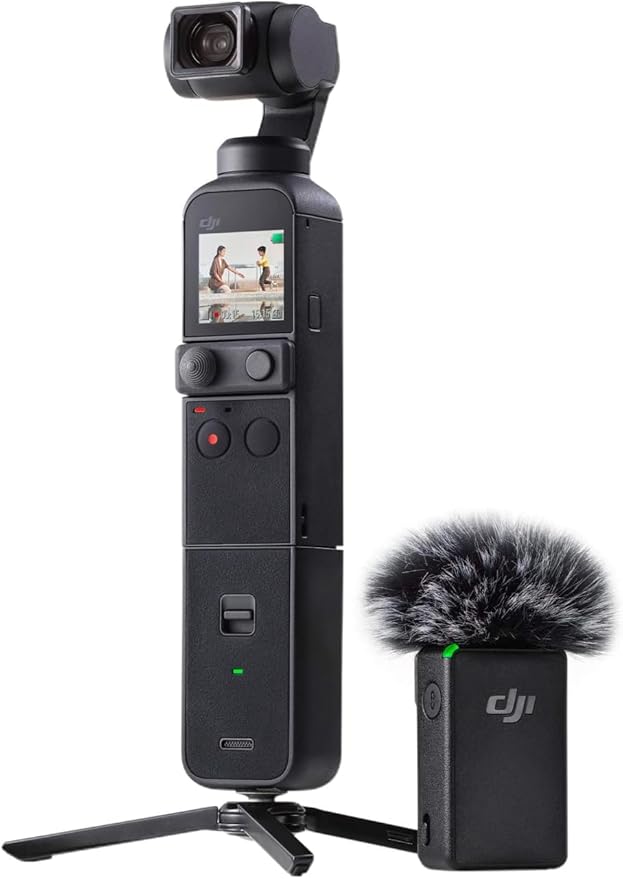
5. DJI Pocket 2 Creator Combo: The All-in-One Vlogging Solution
The DJI Pocket 2 Creator Combo offers a comprehensive package for vloggers and content creators seeking an all-in-one solution. This combo includes essential accessories that enhance its already impressive capabilities, making it a powerful tool right out of the box.
Key Features:
•3-Axis Handheld Gimbal Stabilizer with 4K Camera: Delivers incredibly stable and high-resolution video, a hallmark of DJI’s Pocket series.
•Ultra HD Video & 64 MP Pixel High-Resolution Photo: Capture stunning 4K video and incredibly detailed 64MP photos, offering versatility for various content types.
•1/1.7” CMOS Sensor: A larger sensor than many compact cameras, improving image quality and low-light performance.
•HDR, Noise Reduction, Time Lapse, Slow Motion: A suite of features to enhance your footage, from dynamic range to creative effects.
•Creator Combo Accessories: Often includes a wide-angle lens, wireless microphone, and a mini control stick, expanding its functionality significantly.
Why it’s great for content creators: The DJI Pocket 2 Creator Combo is perfect for vloggers who want a complete, ready-to-go setup that provides excellent video quality, superior stabilization, and enhanced audio capabilities for professional-sounding content.
Unique angles, pet vlogging, discreet captures, agile creators
DJI Pocket 2 Creator Combo
All-in-one 4K/64MP, 1/1.7” CMOS, Accessories
Comprehensive vlogging, professional audio, versatile shooting
Each of these cameras offers unique advantages, empowering you to capture your vision with clarity and creativity. Consider your primary content type, desired portability, and specific features to make the best choice for your content creation journey. Happy vlogging!
Disclaimer: Links on this page are affiliate links to Amazon.com, whereby if you make a purchase we earn a small commission.
If you’ve ever fumbled through keyboard shortcuts mid-stream or clicked the wrong OBS (Open Broadcast System) scene while live… you already know the pain.
Modern content creation is exciting, but it’s also chaotic. Switching scenes in OBS, muting Discord, launching apps, triggering overlays, adjusting audio, posting chat links all while trying to look calm on camera.
That’s exactly why the Elgato Stream Deck has become one of the most popular tools for streamers, YouTubers, podcasters, and online entrepreneurs.
But is the Elgato Stream Deck actually worth it in 2026? Or is it just another flashy gadget on Amazon?
In this detailed review, we’ll break down:
What the Elgato Stream Deck does
Who it’s best for
Key features & real-world use cases
Pros and cons
Whether you should buy it
Let’s dive in.
What Is the Elgato Stream Deck?
The Elgato Stream Deck is a customizable control pad with programmable LCD keys that trigger actions with a single tap.
Instead of memorizing keyboard shortcuts, you press a visual button.
Each key can:
Switch OBS scenes
Control Twitch or YouTube streams
Adjust audio
Launch apps or websites
Trigger sound effects
Run multi-step automations
Control smart home devices
Execute macros
Think of it as a command center for your entire digital workflow.
In today’s fast-paced world, your laptop is more than just a device; it’s your mobile office, creative studio, and entertainment hub. Protecting this invaluable asset while maintaining a sense of style and professionalism is paramount. For those who demand the best, a premium laptop bag isn’t just an accessory, it’s an investment in durability, organization, and sophisticated design. We’ve scoured Amazon to bring you five high-demand, high-end laptop bags that promise to elevate your everyday carry and offer unparalleled benefits.
1. Tumi Alpha 3 Expandable Organizer Laptop Brief
When it comes to business travel and executive style, Tumi is a name that resonates with quality and prestige. The Tumi Alpha 3 Expandable Organizer Laptop Brief is a testament to this legacy. Crafted from Tumi’s signature ballistic nylon, this brief is not only incredibly durable but also features the Tumi Tracer® program, offering peace of mind in case of loss.
Its expandable design and meticulously organized compartments ensure that every document, gadget, and essential has its place. This bag is for the discerning professional who values longevity, security, and a polished appearance that speaks volumes without saying a word.
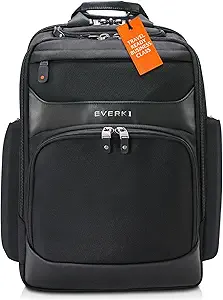
2. Everki Onyx Premium Business Executive Laptop Backpack
For the tech-savvy professional who prioritizes protection and comfort, the Everki Onyx Premium Business Executive Laptop Backpack is a game-changer. This backpack is engineered to safeguard your high-end electronics with features like a hard-shell sunglasses case, RFID protection for your sensitive data, and plush felt-lined pockets for your laptop and tablet. Its ergonomic design ensures comfort even during long commutes or extensive travel, making it a favorite among frequent flyers.
The Everki Onyx is more than just a backpack, it’s a mobile command center designed to keep your tech secure and accessible, all while exuding a sleek, professional aesthetic.
The Nomatic Travel Pack has achieved viral popularity among digital nomads, minimalist travelers, and anyone who appreciates intelligent design. Available in 20L and 30L capacities, this pack seamlessly transitions from a daily carry to a travel companion. Its innovative features, such as magnetic water bottle pockets, an RFID-safe pocket, and a cord pass-through system, cater to the modern individual’s every need.
The Nomatic Travel Pack isn’t just about carrying your essentials, it’s about optimizing your journey with unparalleled organization, a sleek modern look, and the versatility to adapt to any adventure.
Creatives, photographers, and tech enthusiasts often find their perfect match in the Peak Design Everyday Backpack. This award-winning bag is renowned for its highly customizable interior, thanks to its innovative FlexFold dividers, which allow you to configure the space to fit your specific gear. The MagLatch hardware provides secure and quick access, while the weatherproof shell ensures your valuable equipment stays protected in any environment. With dual side access, you can grab your camera or laptop without missing a beat.
The Peak Design Everyday Backpack is a statement piece that combines functionality with a distinctive, stylish design.
For the urban professional who seeks a blend of style, versatility, and smart organization, the Bellroy Tokyo Totepack is an exceptional choice. This ingenious bag effortlessly converts from a sophisticated tote to a comfortable backpack, adapting to your day’s demands. It features a padded laptop sleeve, internal pop pockets for smaller items, and is crafted from water-resistant fabric, making it ideal for city commutes.
The Bellroy Tokyo Totepack offers a professional aesthetic that seamlessly integrates into any meeting or casual outing, proving that functional design can indeed be elegant and discreet.
Investing in a premium laptop bag is about more than just carrying your device; it’s about enhancing your daily experience with superior protection, thoughtful organization, and undeniable style. Each of these five bags offers a unique blend of features designed to meet the demands of various lifestyles, from the executive traveler to the creative professional. Choose the one that best aligns with your needs and elevate your everyday carry to a new level of sophistication and efficiency. durability.
Please note that links in this post are affiliate links to Amazon.com, when you make a purchase through any of our links, we will receive a small commission.